• Products
  • Download
  • Purchase
  • Support
  • Company
Actipro Software company logo
Twitter Follow Actipro RSS Subscribe (RSS Feed)

The Actipro Blog

Tag Cloud

  • blog
  • docking
  • editors
  • intelliprompt
  • micro charts
  • navigation
  • propertygrid
  • ribbon
  • shared library
  • silverlight
  • syntaxeditor
  • themes
  • views
  • web site
  • winforms
  • winrt
  • wpf

Latest Twitter News

May 14, 2012 at 2:50 PM
IntelliPrompt code snippet features have been added to our VS-like code editor control for #WPF and #Silverlight. http://t.co/1IchOJrr

May 10, 2012 at 9:40 PM
Our new Micro Charts control products for #WPF and #Silverlight are out now. Come build some dashboards with them! http://t.co/EEERvff0

May 7, 2012 at 6:47 AM
Today we look at bar charts, for our upcoming #WPF, #Silverlight, and #WinRT Micro Charts product. http://t.co/gxHuPS6B

May 4, 2012 at 6:25 AM
See a gallery of micro area charts in our upcoming release for #WPF, #Silverlight, and #WinRT. http://t.co/qDXGwW8B

May 3, 2012 at 6:32 AM
See a variety of line charts that are easy to make with our upcoming #WPF, #Silverlight, #WinRT Micro Charts product. http://t.co/mbkX6tJd

Twitter Follow us on Twitter

Month List

  • 2012
    • May (9)
    • April (6)
    • March (11)
    • February (11)
    • January (2)
  • 2011
    • December (2)
    • November (7)
    • October (2)
    • September (1)
    • August (5)
    • July (3)
    • June (6)
    • May (5)
    • April (8)
    • March (4)
    • February (5)
    • January (9)
  • 2010
    • December (9)
    • November (10)
    • October (4)
    • September (8)
    • August (12)
    • July (9)
    • June (7)
    • May (6)
    • April (7)
    • March (6)
    • February (6)
    • January (4)
  • 2009
    • December (2)
    • November (2)
    • October (12)
    • September (3)
    • August (11)
    • July (10)
    • June (6)
    • May (3)
    • April (7)
    • March (6)
    • February (8)
    • January (10)
  • 2008
    • December (10)
    • November (2)
    • October (3)
    • September (5)
    • August (5)
    • July (8)
    • June (4)
    • May (4)
    • April (10)
    • March (8)
    • February (1)
    • January (2)

Category List

  • RSS feed for ActiproActipro (321)
  • RSS feed for Blog SummaryBlog Summary (15)
  • RSS feed for GeneralGeneral (43)
  • RSS feed for In developmentIn development (164)
  • RSS feed for New featuresNew features (155)
  • RSS feed for New productNew product (38)
  • RSS feed for PromotionPromotion (2)
  • RSS feed for SilverlightSilverlight (90)
  • RSS feed for Tips and tricksTips and tricks (4)
  • RSS feed for Visual Studio 2008Visual Studio 2008 (2)
  • RSS feed for Windows FormsWindows Forms (22)
  • RSS feed for Windows VistaWindows Vista (10)
  • RSS feed for WinRTWinRT (9)
  • RSS feed for WPFWPF (257)
  • RSS feed for XAMLXAML (23)

About Us

Actipro Software is a leading provider of .NET user interface controls for the WPF, Silverlight, and WinForms frameworks, and is most well-known for their SyntaxEditor syntax-highlighting code editor control.

Please take some time to learn more about us and our product offerings.

WPF Studio 2011.1 Released

January 28, 2011 at 10:32 AM
by Bill Henning (Actipro)

BlogPostBanner

We’re very pleased to announce that WPF Studio 2011.1 build 540 has been released and is now available for download.  This version has a lot of very large updates, especially in the Docking/MDI and SyntaxEditor products.

Major new features are described below.  See the announcement post for the detailed list of enhancements and updates.

TaskDownload TaskLiveDemo TaskBuyNow


ProductHeadingWPFBarCode

2D QR Code

Our Bar Code product now includes a complete QR Code implementation that fully adheres to standards and allows you to code an enormous amount of data since it is two-dimensional.

QRCode

Most modern mobile phones have bar code scanner apps that can read these codes.  When a URL is specified in the code, the apps redirect a browser right to it for more information.


ProductHeadingWPFDocking

Complete MVVM Support

New updates effectively let DockSite behave like an ItemsControl.  It can now bind to a collection of view models.  Each view model auto generates a docking window as a container (overridable in the same way you can with ItemsControl) that will wrap the view model and display content for it.

An implicitly defined DataTemplate resource for the view model can be used to render the view model’s content within the docking window.  An ItemContainerStyle can be set on the DockSite to bind docking window properties like Title, etc. to appropriate properties on the view model.

New MVVM demos and QuickStarts are included in our Sample Browser, along with some reusable common code (which you are free to use).  In addition, we have a new MVVM Features topic in our help file.

Prism 2.2 and 4.0 Integration

For Prism support, we've added the Docking/Prism Interop assembly, which includes a region adapter for the DockSite control.  Once the region adapter has been registered, the DockSite can be registered/named as a region, and you can add one or more views to it.  By default, the views will become documents (i.e. DocumentWindows) in the DockSite.  This can be altered by adding some metadata to tell the adapter whether you want the specified view to become a document or tool.
 
The installer comes with a prebuilt version of the Docking/Prism Interop assembly that targets Prism 2.2.  The Docking/Prism Interop source code is available at http://actipro.codeplex.com, and it is ready to be compiled to target Prism 4.0 . We've included a project file for both versions and used #if's to support both versions with the same code.

There are two new Prism samples included in 2011.1 that leverage Unity, with one targeting Prism 2.2 and one targeting Prism 4.0.

Miscellaneous Updates

Docking windows and containers now support the starting of drag operations programmatically. 

We also have merged all document and tool window styles into a single style for easier definition and support of implicit styles going forward.


ProductHeadingWPFEditors

Calculator Control

The new Calculator control can be used by end-users to interactively calculate numeric values.  It supports all the standard calculator functions, including: memory saving/recalling, square root, and inverse.  Three different display modes are available to show more or less functionality.

Calc

It is used as the default drop-down for several of the numeric EditBox controls, as seen above.

Rating Control

The new Rating control inherits from ItemsControl and renders glyphs that can be used present an average rating or collect a user rating.

Rating1

By default, attractive star glyphs are used, but these can be easily replaced with any custom glyph.  There is also support for both horizontal and vertical orientations.

Rating2

In this screen for a restaurant review UI, a custom fork glyph is used as the rating item template.


ProductHeadingWPFPropertyGrid

Miscellaneous Updates

Property Editors can now also be assigned by the type of the associated object, as well as by property name and type, which were previously supported.

Overridable methods have been added to DataFactory to allow easier customization of properties.


ProductHeadingWPFSyntaxEditor

LL(*) Parser Framework Enhancements

An enormous amount of new features have been added to the LL(*) Parser Framework in 2011.1:

  • Type-specific AST node (distinct classes for each type of AST node) support.
  • Language Designer AST node code generation.
  • Language Designer ability to open assemblies that contain multiple parsers.
  • New tree constructors.
  • New can-match callback helper methods.
  • New error reporting methods.

See our previous blog post series for details on the new features.

First .NET Languages Add-on Beta

The long-awaited first beta of the WPF SyntaxEditor .NET Languages Add-on is now available.  Features for both the C# and Visual Basic languages include:

  • Abstract syntax tree (AST) generation.
  • Over 130 distinct AST node classes.
  • Automatic code outlining based on AST structure.
  • Reporting and automatic squiggle display of errors for invalid syntax.
  • Mouse hover quick info for syntax errors.
  • Line commenting.
  • Optionally change the parser to parse expressions, statements, etc. instead of compilation units.

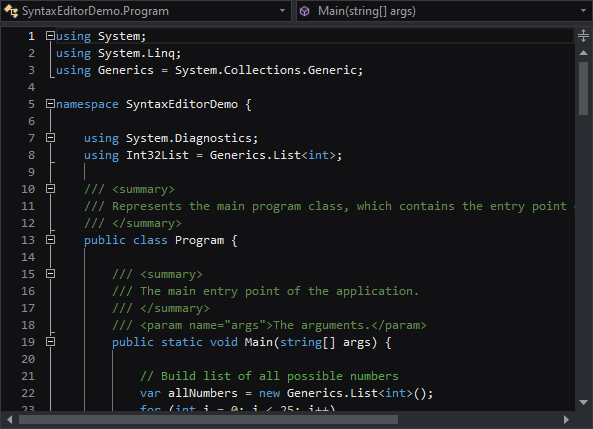
DotNetAddonCSharp

The add-on has been extremely well tested and is ready for production use.  We only are keeping the beta tag on it until we add automated IntelliPrompt features.  We will be working on those in the coming weeks now that the first phase of the add-on is complete.

Web Languages Add-on Updates

The XML schema resolver now supports a default namespace, meaning that a xmlns attribute isn’t required on the XML’s root element to get automated IntelliPrompt to work based on a schema.

Easy Parsing of Text Strings

We’ve added a new SyntaxLanguageParsingExtensions.Parse extension method for ISyntaxLanguage that uses the language's IParser to parse specified text in the calling thread and return the IParseData result.  This feature makes it easy to parse a code snippet.

Squiggle Lines at Document End

Squiggle lines now can render at the document end, which is a common syntax error location when typing near the end of a document.

Performance Enhancements

We’ve implemented some major performance improvements in several areas of the product and in the Web Languages Add-on.


ProductHeadingWPFViews

FanPanel Control

The new FanPanel control allows child elements to be positioned in sequential order along the z-axis, while keeping a focal item centered in the view. Additionally, items below or above the focal element can be easily faded, rotated, or offset using customizable properties, providing for some visually appealing layouts. 

FanPanel1

This screen shows a horizontal layout where the focus item is in the middle and items before and after rotate away and fade out.

FanPanel2

In this screen, the items render over the same center point and look similar to albums in Media Player.

FanPanel3

In this layout we add a twist to the items.  There are many configurable properties that allow you create your own special effects.  And as the focal item changes, each item animates to its new position.

Tags: wpf, barcode, docking, editors, propertygrid, syntaxeditor, views
Filed under: Actipro, New features, WPF
Submit to DotNetKicks...
Permalink | Comments (3)

Related posts

PropertyGrid for WPF released as part of WPF Studio v4.5We're very happy to have just released PropertyGrid for WPF, a control we've been working on for sev...Press Release: Actipro Software’s WPF Studio 2010.1 Control Suite Integrates with Visual Studio 2010Actipro’s unique bundle of Windows Presentation Foundation user interface controls offers everything...WPF Studio 2011.1 Build 541 Released WPF Studio 2011.1 build 541 has been released and is now available for download.  This main...

Comments

January 31, 2011 at 21:48  

Jesper

Selecting text and right clicking in the Ribbon SDI external demo crashes it because of security errors.

Jesper Sweden

February 1, 2011 at 03:25  

Bill Henning (Actipro)

Hi Jesper,

Thanks for the note, it looks like XBAP security options must have changed recently in VS.  We've updated our sample to account for the changes.

Bill Henning (Actipro) United States

April 7, 2011 at 10:21  

trackback

Actipro Blog 2011 Q1 Posting Summary

Actipro Blog 2011 Q1 Posting Summary

The Actipro Blog - WPF, Silverlight, and WinForms Development

Comments are closed
Copyright © 1999-2012 Actipro Software LLC. All rights reserved.
Home Actipro Software | Products | Download | Contact Us