• Products
  • Download
  • Purchase
  • Support
  • Company
Actipro Software company logo
Twitter Follow Actipro RSS Subscribe (RSS Feed)

The Actipro Blog

Tag Cloud

  • blog
  • docking
  • editors
  • intelliprompt
  • micro charts
  • navigation
  • propertygrid
  • ribbon
  • shared library
  • silverlight
  • syntaxeditor
  • themes
  • views
  • web site
  • winforms
  • winrt
  • wpf

Latest Twitter News

May 14, 2012 at 2:50 PM
IntelliPrompt code snippet features have been added to our VS-like code editor control for #WPF and #Silverlight. http://t.co/1IchOJrr

May 10, 2012 at 9:40 PM
Our new Micro Charts control products for #WPF and #Silverlight are out now. Come build some dashboards with them! http://t.co/EEERvff0

May 7, 2012 at 6:47 AM
Today we look at bar charts, for our upcoming #WPF, #Silverlight, and #WinRT Micro Charts product. http://t.co/gxHuPS6B

May 4, 2012 at 6:25 AM
See a gallery of micro area charts in our upcoming release for #WPF, #Silverlight, and #WinRT. http://t.co/qDXGwW8B

May 3, 2012 at 6:32 AM
See a variety of line charts that are easy to make with our upcoming #WPF, #Silverlight, #WinRT Micro Charts product. http://t.co/mbkX6tJd

Twitter Follow us on Twitter

Month List

  • 2012
    • May (9)
    • April (6)
    • March (11)
    • February (11)
    • January (2)
  • 2011
    • December (2)
    • November (7)
    • October (2)
    • September (1)
    • August (5)
    • July (3)
    • June (6)
    • May (5)
    • April (8)
    • March (4)
    • February (5)
    • January (9)
  • 2010
    • December (9)
    • November (10)
    • October (4)
    • September (8)
    • August (12)
    • July (9)
    • June (7)
    • May (6)
    • April (7)
    • March (6)
    • February (6)
    • January (4)
  • 2009
    • December (2)
    • November (2)
    • October (12)
    • September (3)
    • August (11)
    • July (10)
    • June (6)
    • May (3)
    • April (7)
    • March (6)
    • February (8)
    • January (10)
  • 2008
    • December (10)
    • November (2)
    • October (3)
    • September (5)
    • August (5)
    • July (8)
    • June (4)
    • May (4)
    • April (10)
    • March (8)
    • February (1)
    • January (2)

Category List

  • RSS feed for ActiproActipro (321)
  • RSS feed for Blog SummaryBlog Summary (15)
  • RSS feed for GeneralGeneral (43)
  • RSS feed for In developmentIn development (164)
  • RSS feed for New featuresNew features (155)
  • RSS feed for New productNew product (38)
  • RSS feed for PromotionPromotion (2)
  • RSS feed for SilverlightSilverlight (90)
  • RSS feed for Tips and tricksTips and tricks (4)
  • RSS feed for Visual Studio 2008Visual Studio 2008 (2)
  • RSS feed for Windows FormsWindows Forms (22)
  • RSS feed for Windows VistaWindows Vista (10)
  • RSS feed for WinRTWinRT (9)
  • RSS feed for WPFWPF (257)
  • RSS feed for XAMLXAML (23)

About Us

Actipro Software is a leading provider of .NET user interface controls for the WPF, Silverlight, and WinForms frameworks, and is most well-known for their SyntaxEditor syntax-highlighting code editor control.

Please take some time to learn more about us and our product offerings.

Preview of upcoming Ribbon for WPF updates

March 31, 2010 at 6:16 AM
by Bill Henning (Actipro)

The WPF Studio 2010.1 version that is planned for release in April includes a number of updates to Ribbon.  We’ll highlight some of these over the coming days.

Ribbon templates updated to the “Scenic” look

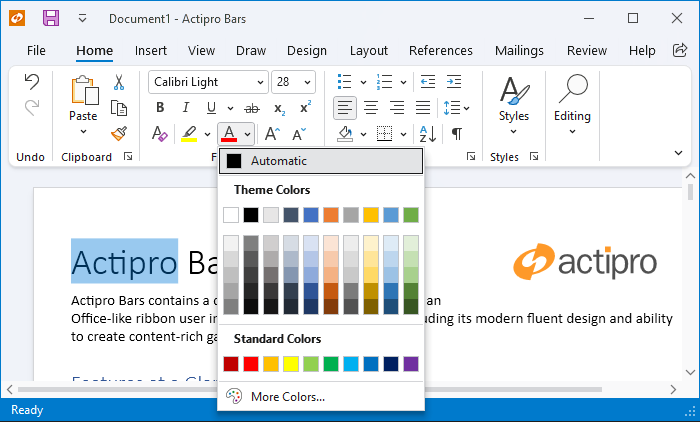
Many customers have voiced their opinions that we need to migrate to the newer ribbon look that is in the Windows 7 “Scenic” ribbon, and the Office 2010 ribbon.  So that’s what we’ve done… here is a preview of how the Ribbon will look in the 2010.1 version:

RibbonMainDemo

And here is a screenshot of the Ribbon in its Office blue theme when not using glass, and the application button is clicked…

RibbonAppMenu

Brief change list

These main changes have been made:

  • The application button is no longer an “orb”.  It now matches how all of the more modern ribbons are made, which have a File button in the tab row that is more discoverable by end users.  On a side note, you can customize the application button to show an image instead.  We’ll show that in the next post.
  • The application button is now completely in the tab area of the ribbon.
  • The RibbonWindow’s Icon is now always visible.
  • The QAT (when above the ribbon) is now aligned right next to the window icon.
  • The QAT (when above the ribbon) is now rendered a bit differently, and is cleaner.  It no longer has borders or a background.
  • The application menu is rendered slightly differently to mesh better with the new application button look.
  • All outer glows no longer use bitmap effects, which are not supported by Microsoft in .NET 4.0.  WPF Studio 2010.1 moves its minimum requirements to .NET 3.5 SP1.  We have taken advantage of .NET 3.5 SP1’s shader effects to achieve outer glows now.

Summary

We have some other interesting new features to go along with the template updates.  We’ll get into those in forthcoming posts.

Also, this first release will align our product with the Scenic ribbon layout.  We have further plans to make the ribbon groups attain the more flat look found in Office 2010 but those updates will be done sometime after the WPF Studio 2010.1 release.

Tags: wpf, ribbon
Filed under: Actipro, In development, WPF, New features
Submit to DotNetKicks...
Permalink | Comments (12)

Related posts

WPF Ribbon Backstage updates include new controls and stylesThe past few days, we’ve been showing some preview screenshots of the upcoming Backstage functionali...Ribbon for WPF Office 2010 theme updatesToday I wanted to quickly share a first preview screenshot of the Office 2010 theme updates we’re do...Themes for WPF Part 1 - Native WPF Control Themes In prior blog posts, we’ve detailed some of the great new features coming to the WPF SyntaxEditor ...

Comments

March 29, 2010 at 13:33  

Mike Strobel

Looking good so far!  FYI, there should be a separator between the application icon and the QAT icons in the title bar.

Mike Strobel United States

March 29, 2010 at 13:46  

Bill Henning (Actipro)

Thanks Mike, we had the separator in there but a property binding was broken in a code update today before the screenshot was taken.  It's fixed now.

Bill Henning (Actipro) United States

March 29, 2010 at 14:41  

Jesper

The application/system menu icon looks to be too far to the left in the non-glass screenshot. The left edge should align with the left edge of the ribbon body or the File tab so that the margin to the left is as wide as the margin at the top.

This looks fantastic. Will the glass extend to behind the tabs/File/Help button as well, as in Office?

Jesper Sweden

March 29, 2010 at 14:54  

Bill Henning (Actipro)

Jesper, right now we still have some aspects of the Office 2007 theme such as the rounded groups, etc.  With those we can't move the app buttpn to line up on the exact left side like where the window icon is yet.  That is part of our future plans for giving groups a more "flat" look and then we can get those aligned better.

Glass won't extend down to tabs yet but that also is something we are considering doing as part of a RibbonWindow update sometime following the initial 2010.1 release.

Bill Henning (Actipro) United States

March 29, 2010 at 15:02  

Mike Strobel

+1 vote for eventual extending of the tab headers into the glass region.

Mike Strobel United States

March 29, 2010 at 15:06  

Mike Strobel

Also, as Jesper noted, the application icon (in the titlebar) is too far to the left, regardless of the ribbon styling.  The left edge of the icon should left-align with the inner edge of the window's client area.  In other words, the icon's left margin should equal the window's border thickness.  You should be able to fix that even with the Office 2007 styling in place.

Mike Strobel United States

March 29, 2010 at 15:07  

Mike Strobel

er, disregard my last comment--the window border is thinner than I realized.

Mike Strobel United States

March 29, 2010 at 15:14  

Bill Henning (Actipro)

Mike, the window icon is already aligned to the left edge of the client area.  The window borders when not using glass are just thinner.  It's the app button and app menu that are in about 3 pixels, and those will be moved left once we go to a more flat group appearance.

Bill Henning (Actipro) United States

March 29, 2010 at 21:39  

trackback

Actipro Blog 2010 Q1 posting summary

Actipro Blog 2010 Q1 posting summary

The Actipro Blog - WPF and WinForms Development

April 2, 2010 at 04:06  

SledgeHammer01

Does this mean you are scrapping the 2007 look? Personally, I think the scenic ribbon looks "cheap" compared to the Office 2007 look, but thats just me Smile. Hopefully you can maintain the 2007 look for those of us that prefer that.

SledgeHammer01 United States

April 4, 2010 at 04:16  

Bill Henning (Actipro)

We're looking into adding an option to keep the orb app button instead.  It depends on if the layout can be adjusted properly since the app button is in a totally different spot in the template now.

Bill Henning (Actipro) United States

April 5, 2010 at 08:20  

Bill Henning (Actipro)

By default the Scenic style will be used starting with 2010.1 but we have a new Ribbon.UseScenicLayout property that can be set to false to restore the older "orb" style app button and related layout.

Bill Henning (Actipro) United States

Comments are closed
Copyright © 1999-2012 Actipro Software LLC. All rights reserved.
Home Actipro Software | Products | Download | Contact Us