• Products
  • Download
  • Purchase
  • Support
  • Company
Actipro Software company logo
Twitter Follow Actipro RSS Subscribe (RSS Feed)

The Actipro Blog

Tag Cloud

  • aero
  • blog
  • docking
  • editors
  • gauge
  • intelliprompt
  • navigation
  • propertygrid
  • ribbon
  • shared library
  • silverlight
  • syntaxeditor
  • themes
  • views
  • winforms
  • wpf

Latest Twitter News

November 21, 2011 at 11:14 AM
#WPF Studio 2011.2 is out now! Includes enhanced themes for native WPF conrtols and new SyntaxEditor features. http://t.co/uEMCaGPG

September 26, 2011 at 1:25 PM
If you'd like to see our #WPF / #Silverlight SyntaxEditor code editor control ported to Metro, provide feedback here: http://t.co/xXBNIDTi

September 15, 2011 at 8:31 PM
If you want to see SyntaxEditor eventually show up in Win8's #xaml UI, be sure to add your support to this MS thread: http://t.co/FBjz6TuC

August 15, 2011 at 1:47 PM
New SyntaxEditor IntelliPrompt parameter info feature docs/samples ready for the 2011.2 #WPF and #Silverlight releases. http://t.co/ezoYIjv

August 2, 2011 at 2:40 PM
First look at new automated IntelliPrompt parameter info coming to our C#/VB editor control in #WPF / #Silverlight http://t.co/CUz6O1T

Twitter Follow us on Twitter

Month List

  • 2012
    • February (3)
    • January (2)
  • 2011
    • December (2)
    • November (7)
    • October (2)
    • September (1)
    • August (5)
    • July (3)
    • June (6)
    • May (5)
    • April (8)
    • March (4)
    • February (5)
    • January (9)
  • 2010
    • December (9)
    • November (10)
    • October (4)
    • September (8)
    • August (12)
    • July (9)
    • June (7)
    • May (6)
    • April (7)
    • March (6)
    • February (6)
    • January (4)
  • 2009
    • December (2)
    • November (2)
    • October (12)
    • September (3)
    • August (11)
    • July (10)
    • June (6)
    • May (3)
    • April (7)
    • March (6)
    • February (8)
    • January (10)
  • 2008
    • December (10)
    • November (2)
    • October (3)
    • September (5)
    • August (5)
    • July (8)
    • June (4)
    • May (4)
    • April (10)
    • March (8)
    • February (1)
    • January (2)

Category List

  • RSS feed for ActiproActipro (289)
  • RSS feed for Blog SummaryBlog Summary (13)
  • RSS feed for GeneralGeneral (34)
  • RSS feed for In developmentIn development (150)
  • RSS feed for New featuresNew features (140)
  • RSS feed for New productNew product (30)
  • RSS feed for PromotionPromotion (2)
  • RSS feed for SilverlightSilverlight (71)
  • RSS feed for Tips and tricksTips and tricks (4)
  • RSS feed for Visual Studio 2008Visual Studio 2008 (2)
  • RSS feed for Windows FormsWindows Forms (20)
  • RSS feed for Windows VistaWindows Vista (10)
  • RSS feed for WPFWPF (235)
  • RSS feed for XAMLXAML (23)

About Us

Actipro Software is a leading provider of .NET user interface controls for the WPF, Silverlight, and WinForms frameworks, and is most well-known for their SyntaxEditor syntax-highlighting code editor control.

Please take some time to learn more about us and our product offerings.

Next SyntaxEditor for WPF build gets mouse hover and IntelliPrompt quick info providers

September 10, 2009 at 2:43 AM
by Bill Henning (Actipro)

One highly requested feature for SyntaxEditor for WPF is the ability to be notified when a mouse hover occurs so that IntelliPrompt quick info tips can be displayed in response.  Since WPF doesn’t include a mouse hover event, we implemented one ourselves that fires for editor views.

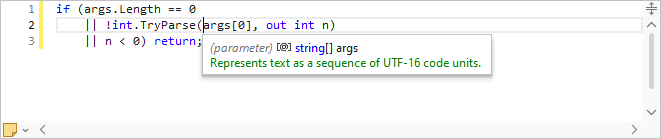
We didn’t stop there though.  We wanted to make it simple for a language to provide quick info popups in response to mouse hover events.  Thus we came up with the new IQuickInfoProvider service.  This service can be registered with a language.  It has three methods on it:

   1: object GetContext(IHitTestResult hitTestResult);
   2: object GetContext(IEditorView view, int offset);
   3: void RequestSession(IEditorView view, object context, bool canTrackMouse);

We offer a QuickInfoProviderBase abstract class that should be used as a base class for any implementations of IQuickInfoProvider that you create.  QuickInfoProviderBase fully implements mouse tracking such that when a mouse hover occurs over an editor view, it calls the GetContext overload that accepts an IHitTestResult.  The IHitTestResult comes from our previously-discussed hit testing feature.  The default implementation of this overload is to call the other GetContext overload if the hit is over a character in the text area.

The GetContext methods should return some object that gives detail about what is at the specified hit or offset, or a null reference if it is not important.  This could be some object as simple as an IToken or some more complex context object.  The important part is that it supports value equality (Equals method implementation) since as the mouse moves, the context returned by GetContext is compared against the context of any already-open quick info session to see if the existing session should be closed or kept open. 

By using GetContext, the quick info provider knows when the mouse moves outside of the the region that is appropriate to an already-open quick info session, and when to open a new quick info session.  Once a new quick info session is needed, the RequestSession method is called.  It is passed the editor view instance, the context object returned by GetContext, and whether the mouse should be tracked (false when quick info is displayed in response to a toolbar button click for example).

Your RequestSession implementations are expected to create a new quick info session, store the passed context in the session, generate content for the quick info popup, and open the session (display the popup).

By using this new provider mechanism, it’s very easy for languages to automatically support quick info display with a minimal amount of work.  All the mouse handling is done for you.  This feature will be in the next build and we’ve updated our quick info sample to show how easy it is to use.

Tags: wpf, syntaxeditor, intelliprompt
Filed under: Actipro, New features, XAML
Submit to DotNetKicks...
Permalink | Comments (2)

Related posts

Next SyntaxEditor for WPF build gets configurable caret and selection brushesThe next build of SyntaxEditor for WPF will have a number of new properties added to the SyntaxEdito...Next SyntaxEditor for WPF build adds completion list auto-shrink optionWe’re really excited to announce a new option coming in the next SyntaxEditor for WPF build that aut...SyntaxEditor for WPF to get squiggle tag quick info providerThe 2010.2 version of SyntaxEditor for WPF (and the same for the 2010.2 Silverlight Studio release) ...

Comments

September 9, 2009 at 17:27  

Mike Strobel

Very cool!  This is going to be a great component when it's finished.

Mike Strobel United States

October 1, 2009 at 09:41  

trackback

Actipro Blog 2009 Q3 posting summary

Actipro Blog 2009 Q3 posting summary

The Actipro Blog - WPF and WinForms Development

Comments are closed
Copyright © 1999-2012 Actipro Software LLC. All rights reserved.
Home Actipro Software | Products | Download | Contact Us